


D‑Cine Player · 4.2.32 release
DCP Cine Player operations
Clear operating pages connect content, keys, playlists, scheduling, live control and evidence of what actually played.
A repeatable operating day
Check
Confirm screen/version/licence, qualified time, both disks, output and today’s chronological schedule/countdown.
Ingest and unlock
Scan the typed source, finish transfer/integrity/indexing and check recipient/content keys for the whole performance window.
Build and rehearse
Arrange clips, black, timed cues/macros and streams. Inspect warnings and rehearse the physical picture/audio/automation chain.
Schedule
Choose the correct browser-local calendar instant, inspect conflicts/turnaround, then enable SCHED deliberately.
Monitor
Follow actual items and correlate the booking with observed SPL/CPL start/end and cue outcomes in Status/audit.
Recover
Use bounded consistency checks, durable jobs and command reconciliation; preserve evidence before deletion or repeated dispatch.
Show structure stays visible
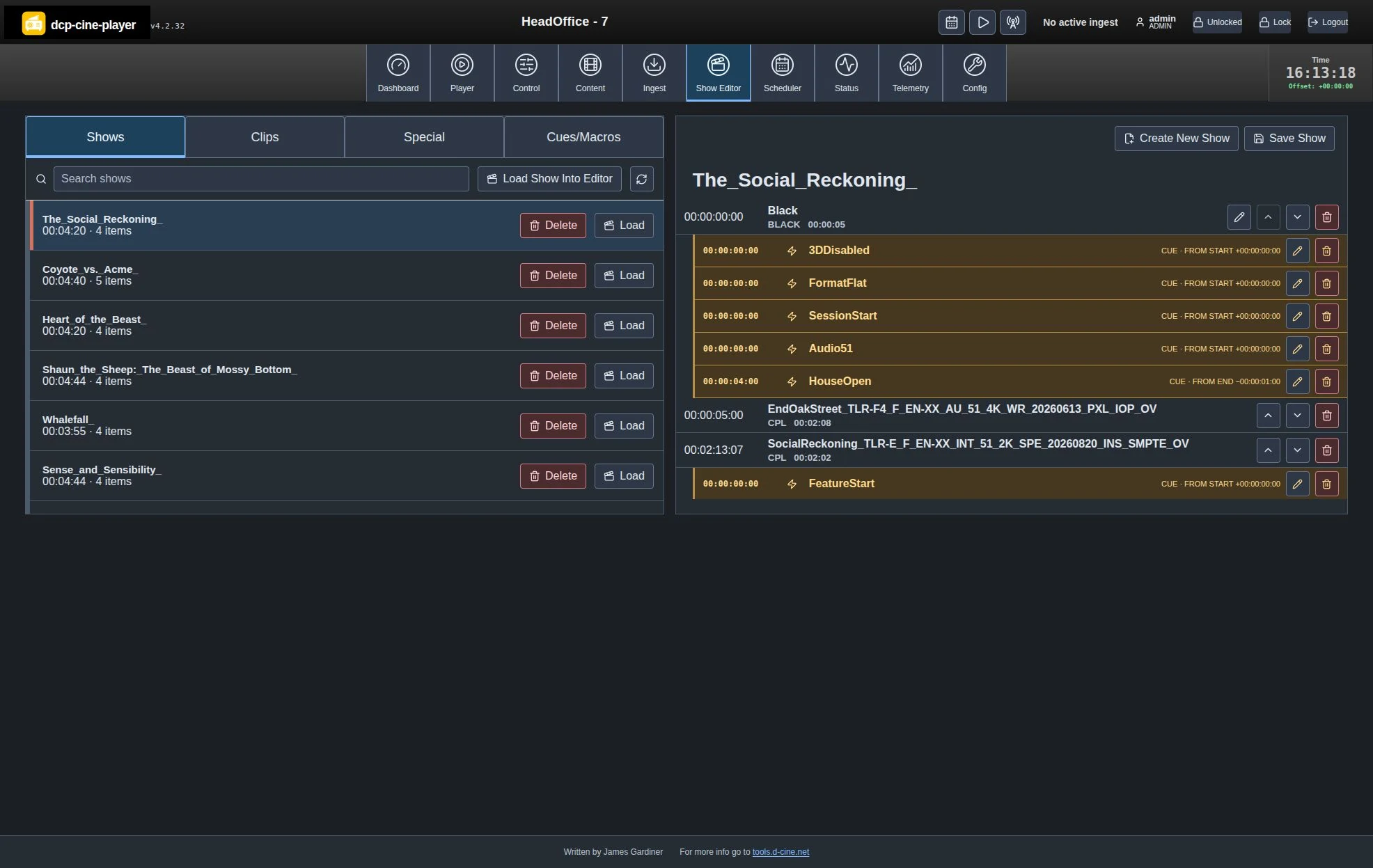
Start/end-relative cues, macros and explicit item durations remain visible alongside the running order. Short scheduler sessions reveal their full name and actions on hover/focus.
Missing/ambiguous automation warns rather than stopping otherwise playable media. Operators can explicitly create missing standard empty names, preserving existing actions. Empty cues do not operate equipment.
Diagnose the installation in the same interface
Storage consistency
Review missing paths, size/access problems and unreferenced deliveries. Eligible DCP/KDM/SPL recovery uses normal validation; deletion is explicitly permanent.
Display and performance
Inspect EDID versus current output, decode/buffer/CPU/frame data and audio/sync. Unknown telemetry is displayed honestly; confirm the physical receiver.
History with purpose
Status uses readable player-zone times and named events rather than per-second progress chatter. Hiding ingest history preserves durable records; it is not a toggle.
Switch to a live presentation deliberately
With playback stopped and SCHED off, enter the configured AirPlay receiver on Player, connect a presenter and verify the output. Leave Casting to release resources and restore the previous stopped selection, then intentionally return to the venue’s schedule.
Daily operator handbookVerify playback and investigateWritten by James Gardiner · Documentation updated 2026-10-31. For more information visit tools.d-cine.net. Check procedures against the installed release and venue policy.

