

Player 4.2.32 · release · Manual updated 31 October 2026
Storage and media recovery
Understand the disks the service actually uses, then inspect missing, inaccessible or unindexed media without changing it during the check.
Read the two Dashboard charts
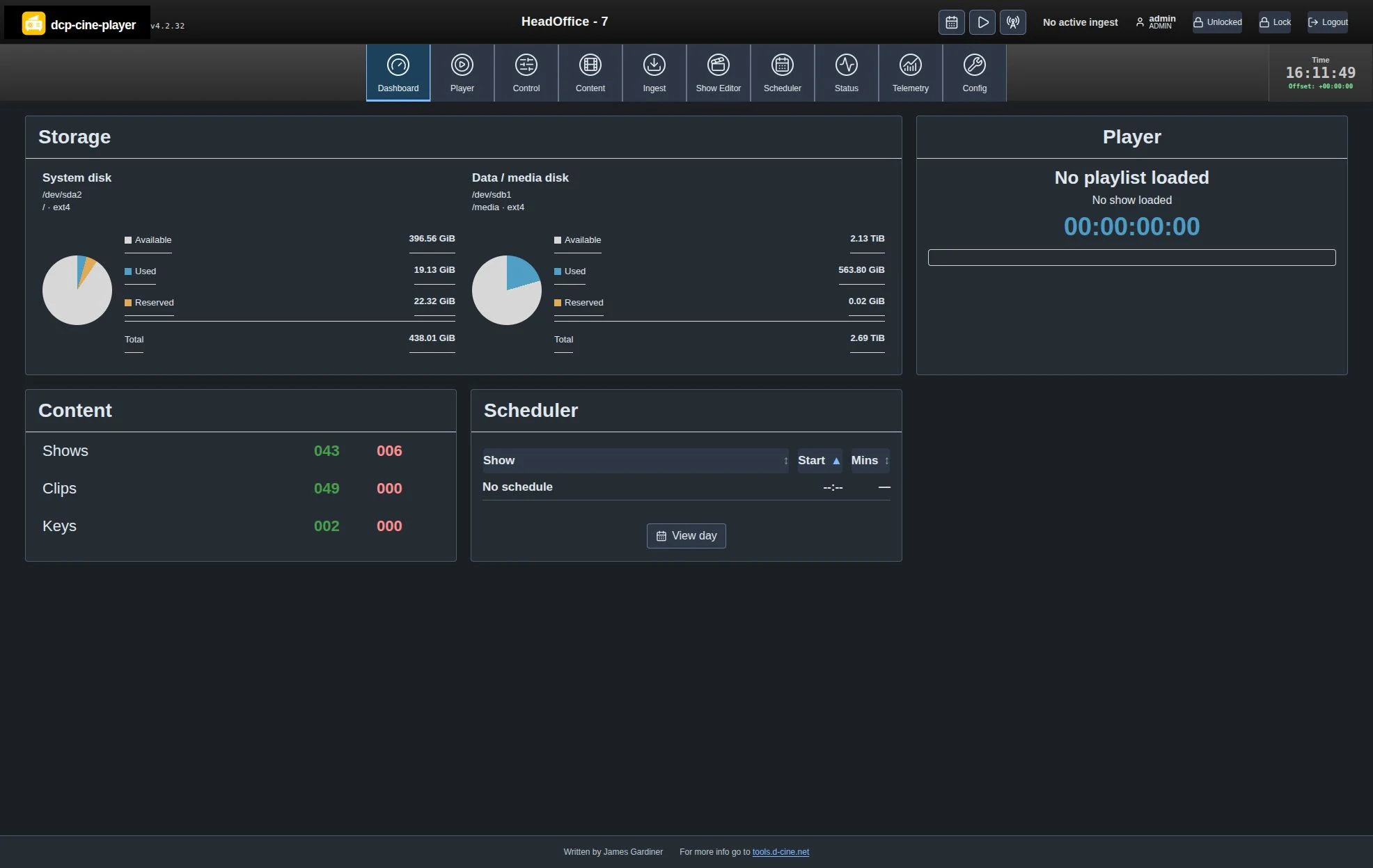
| Chart / label | What it means |
|---|---|
| System disk | Space on the filesystem containing the service working directory: the equivalent of df . there. |
| Data / media disk | Space on the configured media-root filesystem: df <media-root>. On a normal appliance this is under /media. |
| Same disk · shared space | Both paths resolve to the same filesystem identity. Both charts show the same capacity; this is not two separate allocations. |
| Used / available / reserved | Live filesystem counters. Reserved blocks explain why available plus used can be smaller than total. Capacity is not estimated from package count. |
| Disk space unavailable | The path could not be read. Investigate the mount/path/permissions; do not treat it as an empty disk. |
Mount point, device and filesystem identify the actual volume, including symlinks. Different partitions/filesystems on one physical drive have separate accounting. Merely attaching a drive does not configure the media root or move existing content.
Run a consistency check
- Sign in as an administrator. Open Config → System Details → Media storage consistency.
- Choose Check media storage. It runs in the background and lists the roots actually inspected.
- Wait for a complete report. Review missing catalogue paths, indexed-size changes, read/traverse/write problems, low space, partial transfers and unreferenced content.
- Investigate permissions as the player’s service account. A successful check under your SSH account does not prove the player can read or write the same path.
The checker inspects configured storage and KDM roots; where the media root is on a dedicated /media mount it can inspect the volume for dropped deliveries. It skips symlinks, nested filesystems, lost+found and protected database/identity areas. Bounds are two minutes, 100,000 entries and 2,000 findings. A failed/incomplete catalogue or scan disables recovery/deletion actions.
Recover files into the catalogue
| Action offered | Result |
|---|---|
| Ingest DCP | An eligible package already in managed storage is indexed in place; other deliveries use normal copy, integrity and indexing workflows. |
| Import KDM | Uses the existing recipient-aware KDM import. Acceptance and a currently valid play window remain separate checks. |
| Import SPL | Validates the native show playlist. An existing SPL UUID is not overwritten; resolve duplicates deliberately. |
Review the candidate path, confirm the recovery dialog and follow the durable background job. Recovery requires ingest licensing and does not start playback. After completion check the refreshed report, Content/Shows, and Ingest Jobs for readiness or dependency warnings.
Delete only after checking ownership
Unreferenced does not mean unwanted. Keep a backup and establish what the delivery is before choosing Delete…. The dialog explicitly confirms permanent removal of the selected file or whole DCP directory. There is no trash recovery in this operation.
The player rechecks identity, size, modification time, filesystem and current references before acting. Changed candidates, symlinks, incomplete reports, active playback and background jobs block actions. Refresh the report after external changes or a service restart; reports are held only for the current service session.
After adding a media drive
- Have the system administrator mount the intended filesystem persistently and verify the configured media root resolves to it.
- Verify read, traversal and write access for the actual player account. Correct the specific ownership/ACL or mount issue; do not make the whole volume world-writable.
- Confirm the Dashboard device/path/capacity, run the consistency check, then ingest a known test package.
- Verify existing content paths and a normal restart before retiring the previous storage.
Storage behaviour and technical qualification · Logs and evidence
Written by James Gardiner · Documentation updated 2026-10-31. For more information visit tools.d-cine.net. Check procedures against the installed release and venue policy.